Architecture
The server-runner model, interfaces, harness abstraction, credentials, deployment targets, and sandbox boundary.
documented diagram inferred
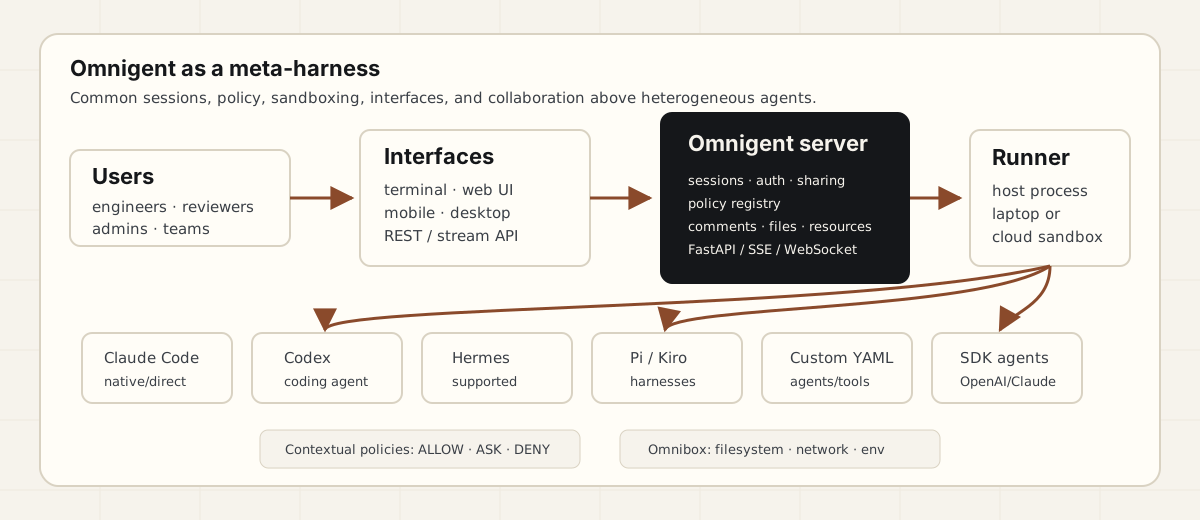
The most useful architecture is a split between server and runner/host. The server coordinates HTTP/SSE/WebSocket traffic, persistence, UI, auth, sharing, and policies. The runner runs on a user machine, dev container, or cloud sandbox and executes the LLM loop and tools, streaming events back. Source: deploy execution model.
Interfaces
Every interface connects to the same persistent session: terminal, web UI, mobile web/PWA, and desktop app. The desktop app is documented for macOS, with Linux and Windows app packages marked as coming soon. Sources: terminal, web UI, mobile, desktop.
Credentials and gateways
Omnigent supports API keys, Claude/ChatGPT subscription CLIs, OpenAI/Anthropic-compatible gateways, and Databricks workspace profiles. The credentials docs list gateways including Databricks Unity AI Gateway, MLflow AI Gateway, OpenRouter, LiteLLM, Portkey, Helicone, Cloudflare AI Gateway, Kong AI Gateway, Vercel AI Gateway, Azure OpenAI, Ollama, LM Studio, vLLM, LocalAI, Hugging Face TGI, and GPT4All. Source: models and credentials.
Deployment menu
The repo deploy guide documents Docker Compose, Render, Railway, Fly.io, Hugging Face Spaces, Modal, Cloudflare Containers with D1/R2, Cloudflare quick tunnel, Tailscale, generic Docker targets such as Cloud Run/Kubernetes, and self-managed Databricks Apps. Source: deploy README.
Cloud sandbox note
There is a useful maturity signal in the docs: the cloud-sandbox page currently emphasizes Modal and Daytona, while the repo/deploy material also discusses Islo, E2B, Kubernetes, OpenShell, Boxlite, CoreWeave, and Databricks. Treat the broader list as repo-documented but unevenly mature until corroborated page by page. Sources: cloud sandbox host, deploy README.